
WhatsApp and artificial intelligence
WhatsApp Business chat limits and account bans: what to do
Is WhatsApp Business preventing new chats, reviewing your account or saying you can no longer use the app? These are different problems. Before paying for a subscription or switching tools, identify the notice and the next step for your business.
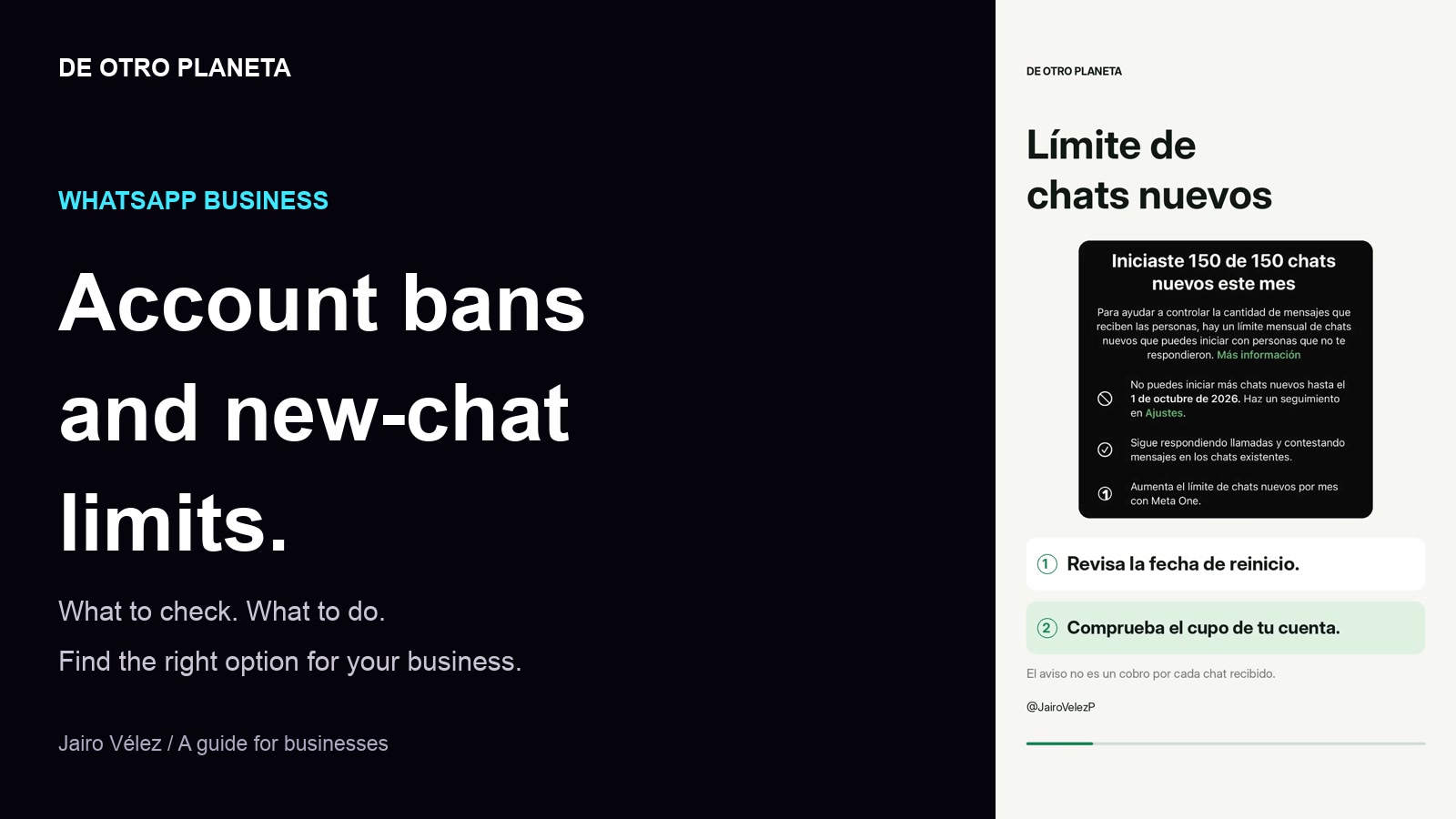
First: chat limits, reviews and bans are different
I am Jairo Vélez, from De Otro Planeta. This guide starts with a business concern: when WhatsApp stops working, service for customers arriving from advertising can stop too. I reviewed account notices and product options to separate problems that are often discussed as though they were the same.
Last year I moved our operation to the API after several account restrictions. That was a decision for our workflow, not a universal prescription or a guarantee against bans. The useful question is what your operation needs and what your account actually says.
- New-chat limit: check the counter, scope and reset date.
- Account under review: check the request through the official channel.
- Suspended account: use the available review or support process.
- API delivery error: review the error code, service window, quality, limits and billing with your provider.
What does a 150- or 300-new-chat limit mean?
Screenshots in this research show accounts with monthly allowances of 150 and 300 new chats. These are examples from those accounts, not a universal limit for every user or country.
The 150-chat notice describes conversations initiated with people who have not replied. It also shows a reset date and permits existing calls and chats to continue. Read your own account notice: a chat counter is not an invoice for every incoming message.
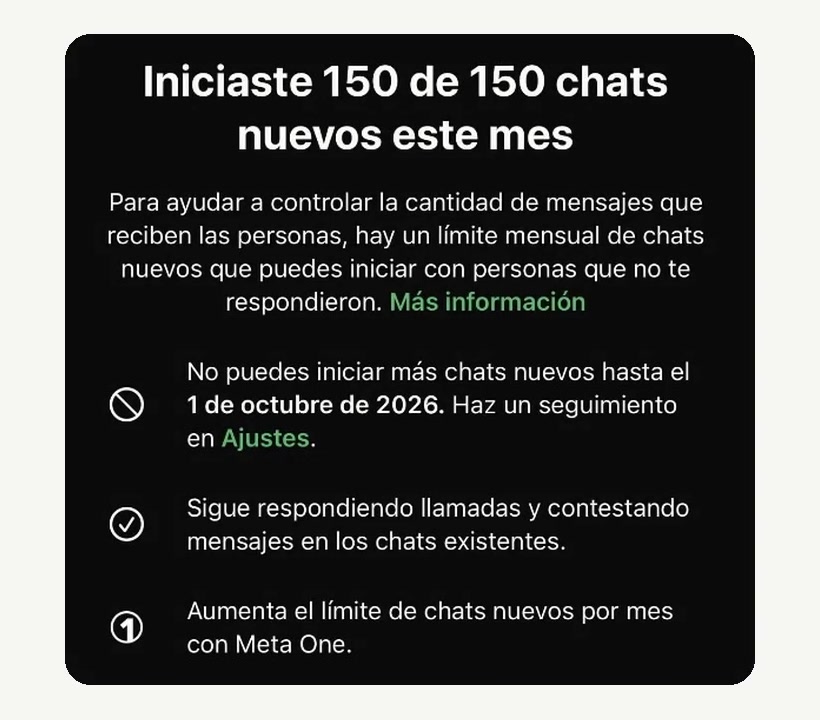
- Save the full notice, counter and reset date.
- Continue only the actions your account permits; do not repeatedly force delivery.
- Before purchasing additional capacity, compare the specific benefit and price available to your account.
WhatsApp Business banned or under review: what to do
A suspension requires a different process from resetting an allowance. If the option to request a review is available, use it. Explain what happened with dates, the exact notice and how you use the account, without sharing access codes.
If a review is already pending, keep the case number and check its status. If that option is absent, consult the official help resources for your product. We do not promise recovery or a fixed turnaround: WhatsApp makes that decision.
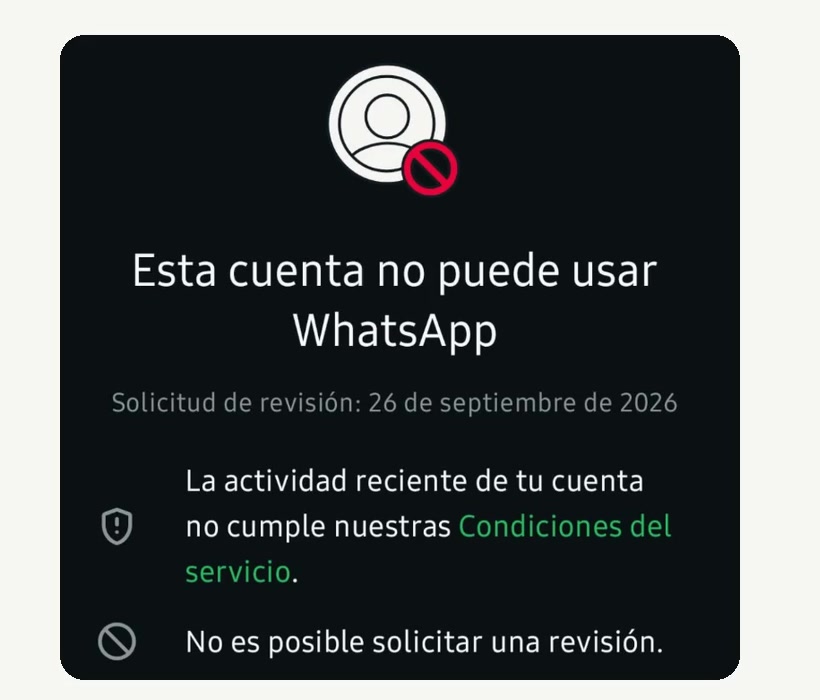
- Check that you use the official app and review linked devices.
- Secure account access and enable two-step verification.
- Do not buy guaranteed unbanning services or use modified apps.
- Provide customers with an alternative support channel while the case is unresolved.
Does the notice appear when serving Facebook or Instagram leads?
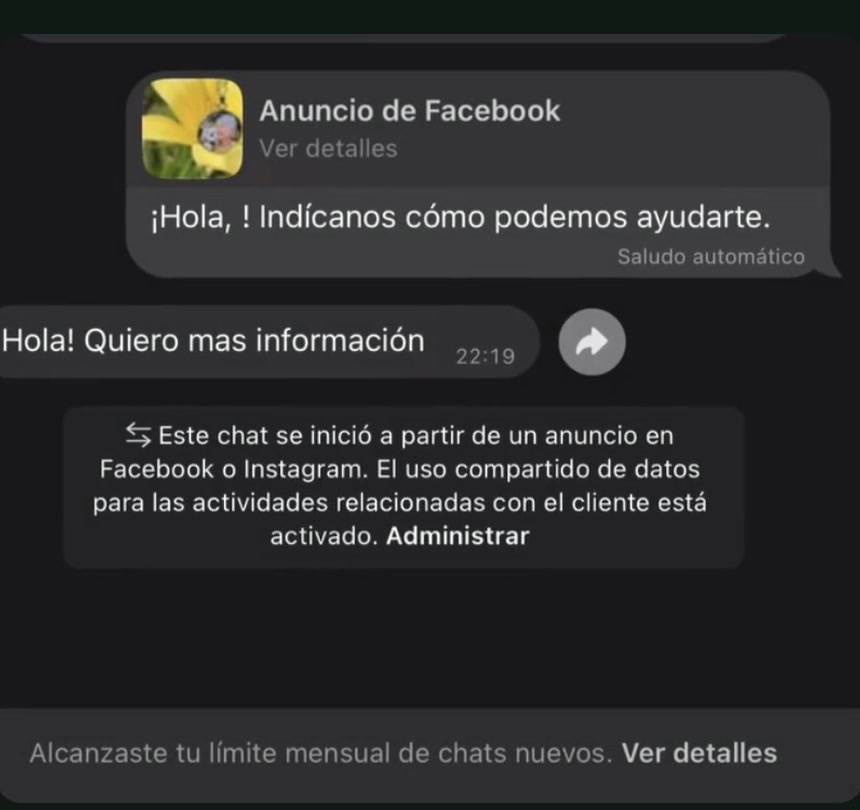
An ad notice and a limit banner inside the same chat do not prove that this lead consumed the allowance. The banner may describe the general account state. Equally, a reported problem deserves investigation.
Record the counter before and after, who initiated the conversation, the source of the contact and the exact error. Check whether an automatic reply was active. Share this evidence with support without publishing customer names, numbers or conversations. We have not performed a controlled test establishing the cause of a counter increase.
Meta One is not WhatsApp Business API
Meta One is an optional in-app subscription. Meta says features and availability vary by region, app and account. The free app remains available; this subscription does not change API functionality or pricing.
If your account offers a larger allowance, check the amount, included features and price after any trial. A subscription can provide tools, but should not be bought as insurance against account bans.
Business App, Coexistence or API: choose for your operation
For basic support, catalogs, labels and quick replies, the app may be sufficient. When several salespeople are involved or you need CRM, assignment and automation, consider an official WhatsApp Business Platform integration.
Coexistence allows compatible accounts and providers to use the app and API with the same number. Before enabling it, confirm eligibility, features, devices, history and exit procedures. Do not delete your account or migrate without a plan.
Compare total cost and operational continuity, not just the subscription: setup, seats, messages, support and data exports. The API does not mean unlimited messaging or exemption from WhatsApp policies.
- App: straightforward customer service without integrations.
- Meta One: specific app benefits your account genuinely needs.
- Coexistence: retain the app alongside a compatible integration, after validation.
- API: multi-agent operations, CRM and automation with a budget and supervision.
Chat limits and API billing measure different things
A 150- or 300-chat counter in the app is not an API service-message allowance. One customer can exchange several messages within one chat; the units are not interchangeable.
Verified in Meta's technical documentation on September 27, 2026: from October 1, each business number receives 1,000 free delivered service messages per month, with charges after that allowance. Unused messages do not roll over. Utility templates inside the service window also become chargeable, subject to applicable exceptions.
These are messages, not people: in a one-to-one example, 100 customers receiving 10 service replies each account for 1,000 deliveries. Meta documents a shared allowance with group service deliveries. Check category, destination market and provider fees. Do not extend API rates to every manual Business app message.
- Check your payment method: Meta states that service delivery stops after the free allowance is used when no payment method is available.
- Consult current rates and exceptions before budgeting. This article is not a quotation.
A 72-hour window does not mean free advertising
For eligible entries from click-to-WhatsApp ads or Facebook buttons on Android or iOS, Meta states that responding within the first 24 hours opens a 72-hour free messaging window from that reply. Not every WhatsApp link qualifies.
Separate advertising spend, messaging and provider or extra-feature fees. The platform's Meta Business Agent category has token charges that are not covered by the free window. The 24-hour service window remains independent: once it closes, the API requires approved templates.
A continuity plan for your sales team
Before increasing ad spend, check your capacity to respond and follow up. For a company with multiple advisors, restoring message delivery is only part of the problem: someone must own the conversation and the customer's next step.
At De Otro Planeta, we recommend a sales record that does not rely solely on one person's phone, role-based access and an alternative contact channel on the website. Keep only necessary information and assign responsibility for updates and backups.
- Record consent and honor requests to stop receiving messages.
- Define who takes over when automation cannot resolve a request.
- Measure answered inquiries, qualified opportunities, quotes and sales, not just messages.
- Document the diagnosis before buying tools or changing numbers.
Frequently asked questions about limits and bans
Does payment restore an account? Purchasing a subscription, API or third-party service does not guarantee recovery. Reviewing a suspension is a different process.
Does switching to personal WhatsApp avoid the limit? We do not recommend this shortcut. A product change does not correct a policy violation or replace an official review.
Does the API prevent all bans? No. It has its own rules, quality controls and limits.
Is Meta banning accounts to force payment? We have no evidence supporting that accusation. Paid products do not establish the reason for a particular suspension.
Sources and references
- WhatsApp: messaging policy and appeal resources ↗
- WhatsApp: account bans ↗
- Meta One: features, availability and API differences ↗
- Meta: WhatsApp Business Platform pricing ↗
- Meta: non-template message pricing updates ↗
- WhatsApp: pricing and free ad entry points ↗
- Meta: onboarding Business App users (Coexistence) ↗
STRATEGY · CREATION · SALES
Let's turn the idea into a plan for your business.
Let's review your offer, your customer journey and improvements that make sense for your business.
Explore AI agents and customer service on WhatsApp ↗Let's discuss your project ↗